


Pujie Watch Faces - Wear OS 6
4.5147.00 Reviews
App Specs
- Version
- 7.0.74f
- Updated On
- License
- Free
- Downloads
- 100,000+
- Developer
- Pujie
- Categories
- Personalization
- Platform
- Android
Screenshots
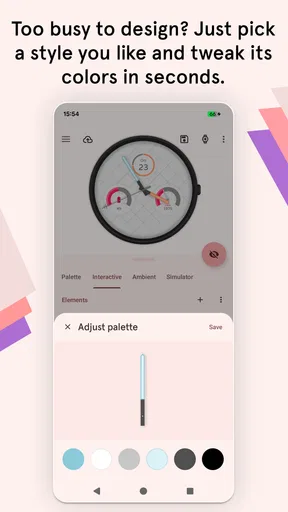
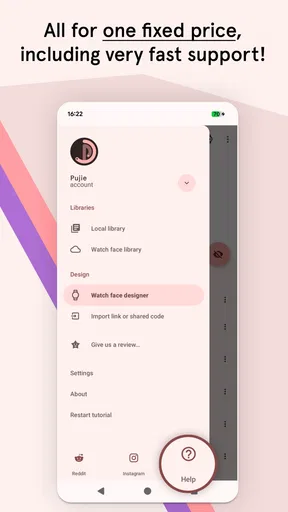
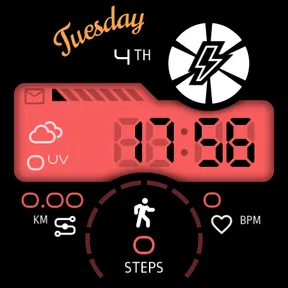
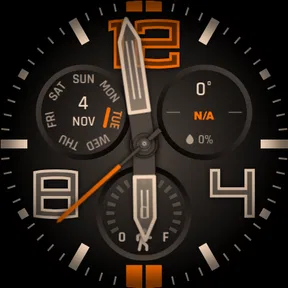
 Analysis by AppCompare
I usually notice a watch face when it gets in the way: the time is hard to read, useful details are buried, or the design feels wrong for the day. That is the problem I’d bring to Pujie Watch Faces - Wear OS. It is a free personalization app from Pujie for Wear OS 6 smartwatches, and its appeal is the chance to shape a watch face around what I actually want to see rather than settling for one fixed look. The app is rated 4.4 on average, with around two thousand ratings, and has over a hundred thousand installs. It is rated for Everyone. Those figures suggest a well-used option, but the more important question is whether its creative freedom makes daily use easier or simply gives me more settings to manage.
From a blank wrist to a useful daily setup
I’d begin by deciding what I want my wrist to tell me during an ordinary day, then use that as a filter while exploring designs instead of browsing endlessly. A useful setup should make the time and one genuinely helpful detail easy to catch at a glance. From there, I’d look at how the phone-based choices carry over to the watch and where a simpler face may serve me better.
Start with what you need to see
Before choosing a design, I’d decide what the watch should do for me at a glance. If I mainly check the time during a busy day, a clear layout matters more than a face packed with details. If I often check my schedule or activity, I might give those elements more room. This simple decision helps keep customization purposeful: a face can look impressive in a preview and still be awkward when I’m walking, carrying something, or checking it under changing light.
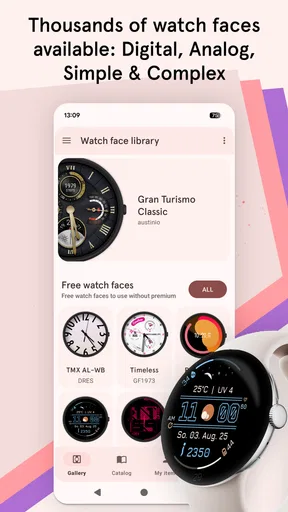
The app’s collection of ready-made faces gives me a quicker starting point than building everything from scratch. I can browse for a style that is already close to what I want, then adjust it instead of spending the first session making every choice myself. The store describes a collection of thousands of faces, which makes variety a central part of the experience. The trade-off is that more choice can mean more browsing, so I’d narrow the search by the job the face needs to do: simple timekeeping, a more personal look, or a glanceable mix of information.
Make one change at a time
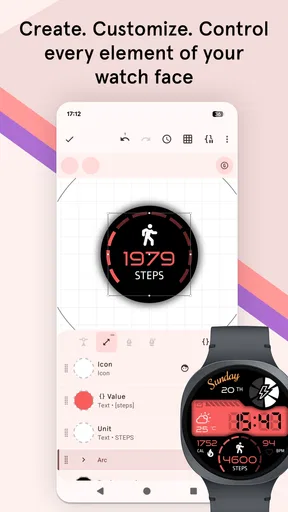
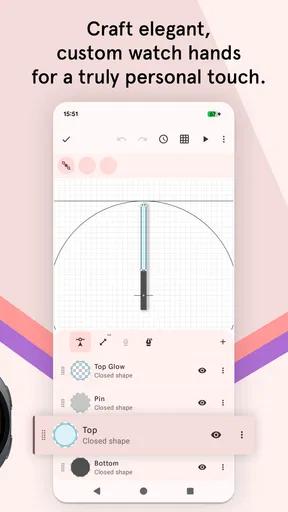
Once I have a starting design, the customization tools are where the app becomes more than a gallery. I can work through the appearance and arrangement in small steps, checking that each change improves readability as well as style. A useful approach is to settle the main colors first, then consider the placement and amount of information. If I change everything at once, it becomes harder to tell which choice made the face easier—or harder—to use.
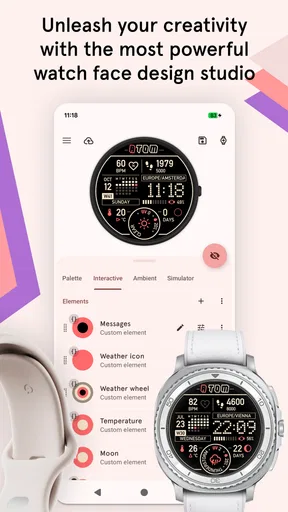
The original review describes a drag-and-drop workflow for adding and removing elements, along with templates for people who want a quicker setup. That combination suits different levels of patience: templates help me get something presentable without a long session, while hands-on adjustments leave room to make the result feel more like mine. I would still treat “more customizable” as an invitation, not an obligation. A restrained layout can be more useful than a crowded one, especially if I want to read the time quickly rather than admire the face while configuring it.
A small practical tip is to judge the design at the size and distance I’ll actually use it. A detail that looks neat while I’m editing on my phone may be too small to read on my wrist. I’d also check the finished face in the ordinary moments that matter to me: a quick glance outdoors, a glance while moving, and a glance when I’m trying not to interrupt a conversation. That test is more useful than endlessly polishing a preview.
Worth Reading Before You Choose

EA SPORTS FC Mobile 26 Is a Bigger Football Game, but It Takes Time

Flipboard Shows What News Apps Must Do Beyond the Feed

Switching to Android Auto Means Rethinking Your Driving Routine

Google Calendar Makes a Crowded Week Easier to Manage

Ludo King Makes the Most of the Minutes Between Plans

Baby Panda World Brings Quick Play to Modern Phones, but Its Game Library Feels Busy
Choose information with care
Widgets can turn the watch face into a more useful glance point, but they also create the clearest design trade-off. The published review mentions options such as weather, calendar events, and fitness information. Those are potentially handy when they answer a question I ask often; they are less valuable if they add clutter or show something I rarely check. I’d choose only the details I genuinely use, then leave enough visual breathing room for the time to remain obvious.
For example, on a workday I might want the next calendar item visible so I can see what is coming without reaching for my phone. On a walk, activity information may be the more useful choice. I would not try to make one face serve every situation if doing so makes it busy. A focused setup for ordinary days is often a better starting point, with a different design available when my routine changes.
The handoff from phone to wrist
A watch-face app has to work across a small but important handoff: I explore and adjust on one device, then rely on the result on my watch. That means the setup experience is only half the test. Before I settle on a face, I’d check that the selected design has carried over as intended and that its important details remain easy to read on the watch itself. If something looks wrong at wrist size, I’d simplify or rearrange it rather than assuming that a more elaborate configuration is automatically better.
This is also where expectations matter. Pujie is a personalization app for Wear OS 6, so it makes sense for someone who enjoys choosing how the watch looks and what it presents. It is not the best fit for someone who wants a completely hands-off experience and never wants to revisit a design. Even a straightforward template involves making a few choices, and a highly tailored face can take more experimentation than a default option.
What the result feels like in everyday use
Imagine heading out for the day with a watch face you have shaped around your routine. You check the time while leaving home, glance at an upcoming event between tasks, and later switch your attention to fitness details during a walk. The benefit is not that the watch suddenly replaces the phone; it is that the information you chose is closer at hand. When the layout stays readable, those quick checks feel natural and the watch feels more personal without demanding constant attention.
That outcome depends on restraint. If every available space is filled, the face can become a tiny dashboard that takes longer to interpret than simply checking the phone. I would start with the time and one or two genuinely useful details, then add more only if I find myself missing them. This is one of the most valuable ways to use a customizable face: treat it as a way to remove unnecessary glances at the phone, not as a challenge to fit everything onto the wrist.
Where this approach can fall short
Compared with the usual alternative—choosing one of the watch faces already available on a device—Pujie puts more emphasis on selection and personal control. A built-in face is often the simpler route if I just want to change the look quickly and move on. Pujie makes more sense if I want to browse a wider range of designs or adjust the face to suit a specific routine. The cost of that flexibility is time: looking through a large collection and tuning a design can become its own project.
There is also a difference between wanting a fresh appearance and wanting an ongoing customization hobby. If I am content with a basic face and rarely use extra information, the larger set of choices may not improve my day. If I enjoy experimenting, the ability to move from a template toward a more personal layout is part of the point. I’d recommend it most to people who can name what they want to see at a glance and are willing to spend a little time making the layout work for them.
Battery life and smoothness are reasonable things to consider with a customized watch face. The original review reports smooth performance and no excessive battery drain in its use, but I would still pay attention to my own watch after changing to a more information-rich design. If I notice an unwanted effect, simplifying the face is a sensible first adjustment. The experience can vary with the particular watch and setup, so I would avoid assuming that every design will behave identically.
Cost is another practical consideration. The app is free to install, while in-app purchases range from $1.99 to $10.99 per item. I’d begin with what is available without paying and decide whether a particular purchase is worth it only after I know what kind of face I actually use. That avoids buying a design simply because it looks appealing in a browse session, before finding out whether its layout suits my everyday habits.
Community, version, and deciding whether to install
Finding faces shared by other users can help when I know the effect I want but do not want to create every detail myself. Browsing community designs is also a useful way to discover layouts I might not have thought of. I would use those designs as starting points rather than assume one will fit perfectly: the information I care about, my preferred visual style, and the way I use my watch may differ from the creator’s priorities.
The current version is 7.0.74f, and the app was released on September 3, 2024. Those details help identify the version and release history, but my choice would still come down to the fit with my watch and routine. Before investing time in a carefully arranged face, I’d make sure the watch is running Wear OS 6, since that is the platform this app is presented for. For someone using a different smartwatch system, a face-making app designed for that system would be the more appropriate choice.
My short answer to the questions I’d ask before installing is straightforward: it is free to try, it is intended for Wear OS 6, and purchases are available if I want paid items. It can suit both a quick template-based setup and a more involved personalization session. I’d choose it over a built-in face when I want more variety and control; I’d stick with the built-in option when speed and simplicity matter more than tailoring the result.
After using this kind of workflow, I’d judge success by whether the face makes ordinary checks quicker and feels comfortable to wear, not by how many elements I managed to add. That is the distinction between a design that looks clever in the editor and one that earns a place in my daily routine.
Customization Galore
When it comes to customization, Pujie Watch Faces - Wear OS is like a candy store for your wrist. It offers a plethora of options to tweak every little detail on your watch face. From color schemes to widgets, you can truly make it your own. I spent hours just playing around, trying to find the perfect combination. The possibilities feel endless, and that’s what makes it so addictive.
User-Friendly Interface
The app’s interface is super intuitive. Setting up your watch face is a breeze, even if you’re not particularly tech-savvy. The drag-and-drop feature makes it easy to add or remove elements. Plus, there are tons of pre-made templates if you're looking for a quick setup. I personally found the learning curve to be minimal, which is always a win in my book.
Performance and Compatibility
Let’s talk performance because nobody wants a laggy watch face, right? I was pleased to see that Pujie runs smoothly on my Wear OS device. It doesn’t drain the battery excessively, which is a relief since that’s often a concern with highly customizable apps. The app is also well-equipped to handle updates, ensuring you always have the latest features and bug fixes.
Widgets and More
Pujie doesn’t just stop at amazing watch faces. It also offers a variety of widgets that you can add to your setup. Whether you want a weather widget, calendar events, or fitness stats, Pujie has you covered. I loved being able to glance at my wrist and get all the info I need without having to dig through my phone. It’s all about convenience, and this app nails it.
Community and Support
One of the standout features is the vibrant community behind Pujie. There’s a whole community of users sharing their creations, which is a fantastic way to get inspired or even find your next favorite design. The developers are also incredibly responsive. They’re always on top of feedback and continuously improve the app based on user suggestions. It’s refreshing to see such dedication and interaction.
In conclusion, if you’re on the hunt for a watch face app that combines depth, versatility, and community spirit, Pujie Watch Faces - Wear OS is worth checking out. It’s a joy to use and adds a personal touch to your smartwatch experience. So go ahead, give it a try, and let your creativity run wild. After all, who doesn’t love a little bit of personalization?
Pros
- Highly customizable watch faces.
- Seamless integration with Wear OS.
- Intuitive and user-friendly interface.
- Regular updates with new features.
- Low battery consumption.
Cons
- Limited free version features.
- Complex setup for beginners.
- Requires Wear OS 6 or higher.
- No standalone app for iOS users.
- Some features need paid version.
FAQs for Pujie Watch Faces - Wear OS 6
What is Pujie Watch Faces - Wear OS 6?
Pujie Watch Faces is a customizable watch face application for Wear OS 6 devices. It allows users to create and personalize their own watch faces with a variety of styles, colors, and data integrations, ensuring a unique and functional experience tailored to individual preferences.
How do I customize my watch face in Pujie Watch Faces?
Customization is simple and intuitive with Pujie Watch Faces. Users can choose from numerous styles, adjust colors, and integrate various widgets such as weather, step count, and calendar events. The user-friendly interface makes it easy to drag and drop elements to design the perfect watch face.
Is Pujie Watch Faces compatible with all Wear OS devices?
Pujie Watch Faces is designed specifically for Wear OS 6, so it is important to ensure your device is running this version or higher. While it should work on most modern Wear OS devices, checking compatibility before downloading is recommended to avoid any issues.
Are there any costs associated with Pujie Watch Faces?
Pujie Watch Faces offers a free version with basic features, but to unlock the full range of customization options, a one-time purchase is required. This premium version includes advanced features and a wider selection of widgets and styles for a more personalized experience.
What support is available if I encounter issues with Pujie Watch Faces?
If you experience any issues, Pujie Watch Faces provides customer support through their official website and email. Additionally, there is a community forum where users can share tips, ask questions, and get help from fellow users, making troubleshooting and learning more accessible.


